Treatment
Expand your story act by act, or episode by episode, into a structured narrative outline — the professional document that bridges your synopsis and your screenplay.
Overview
What a treatment is and what the Treatment panel provides.
A treatment is a narrative document written in present tense, third person, that describes your story scene by scene (or beat by beat) without using screenplay format. It is the document a producer reads to understand exactly how your story will unfold — in enough detail that they can commission a script with confidence.
Thenema Writer's Treatment panel organises your treatment into six Act tabs (ACT I through ACT VI) and ten Episode tabs (EPISODE 1 through EPISODE 10), giving you dedicated writing space for each section. Only the tabs that contain text are included when you export or send the treatment forward.
For a feature, you will use ACT I, ACT II, and ACT III and leave the rest empty. For a TV series pilot you might use ACT I through ACT V and the episode tabs for individual episodes. Leave unused tabs empty — they are ignored by all export functions.
Tabs & Layout
Understanding the panel structure.
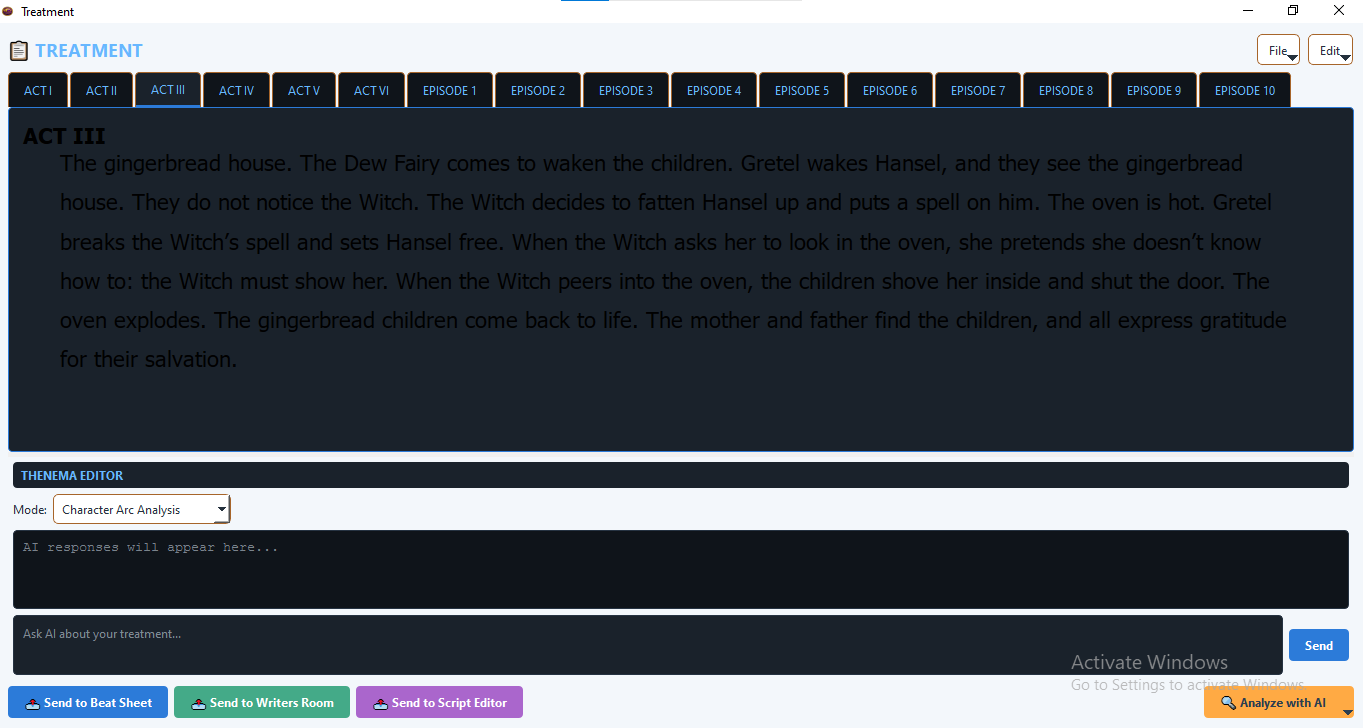
Tab organisation
| Tab Group | Tabs | Use for |
|---|---|---|
| Act tabs | ACT I — ACT VI | Feature films, TV pilots, multi-act structures. |
| Episode tabs | EPISODE 1 — EPISODE 10 | Limited series, episodic arcs, individual episode treatments. |
Header buttons
| Button | What it does |
|---|---|
| File | Open a text or PDF file, save as text, or save as PDF. |
| Edit | Undo, Redo, Cut, Copy, Paste, Select All — operates on the currently active tab. |
The splitter
The panel is split vertically — the tab editor in the top half, and Thenema Editor (if available) in the bottom half. Drag the splitter bar to resize each section. If Thenema Editor is not installed, the full panel height is given to the tab editor.
Writing Act & Episode Tabs
Click any tab to switch to it. Each tab has its own independent text field. Write your treatment for that act or episode directly in the field — plain prose, present tense, third person.
What to write in each act
- ACT I — Introduce the world, protagonist, and central desire. Cover the inciting incident and the decision that launches the main conflict.
- ACT II — The protagonist pursues their goal against mounting obstacles. Cover the midpoint shift, the collapse of their plan, and the moment of apparent defeat.
- ACT III — The protagonist finds a new approach and confronts the central conflict directly. Cover the climax, resolution, and the transformed state of the world.
- ACT IV / V / VI — For TV drama or extended formats, continue the arc or shift to a new set of stakes and subplots.
- Episode tabs — Write a self-contained treatment for each episode, covering the episode's own A-story, B-story, beginning, middle, and end.
A treatment is a readable narrative document. Write "Maya pushes through the crowd and finds the body already cold" not "• Maya finds body." The prose style communicates tone and stakes in a way that bullet points cannot.
Receiving from Other Panels
The Treatment panel can receive content sent from other panels, automatically distributing it across the correct act tabs.
Receiving from Skeleton
When you click Send → Treatment in the Skeleton panel, the outline text is distributed across the act tabs. Lines preceded by act headers (ACT I, ACT II, EPISODE 1 etc.) are placed in the matching tab. Unmatched content falls into the ACT I tab as a starting point.
Receiving from Beat Sheet
The Beat Sheet can send its beats to the Treatment via the 📤 Send to Treatment button. Beats are grouped by their act assignment and distributed into the matching act tabs. Each beat's title and notes become a paragraph in that act's treatment field.
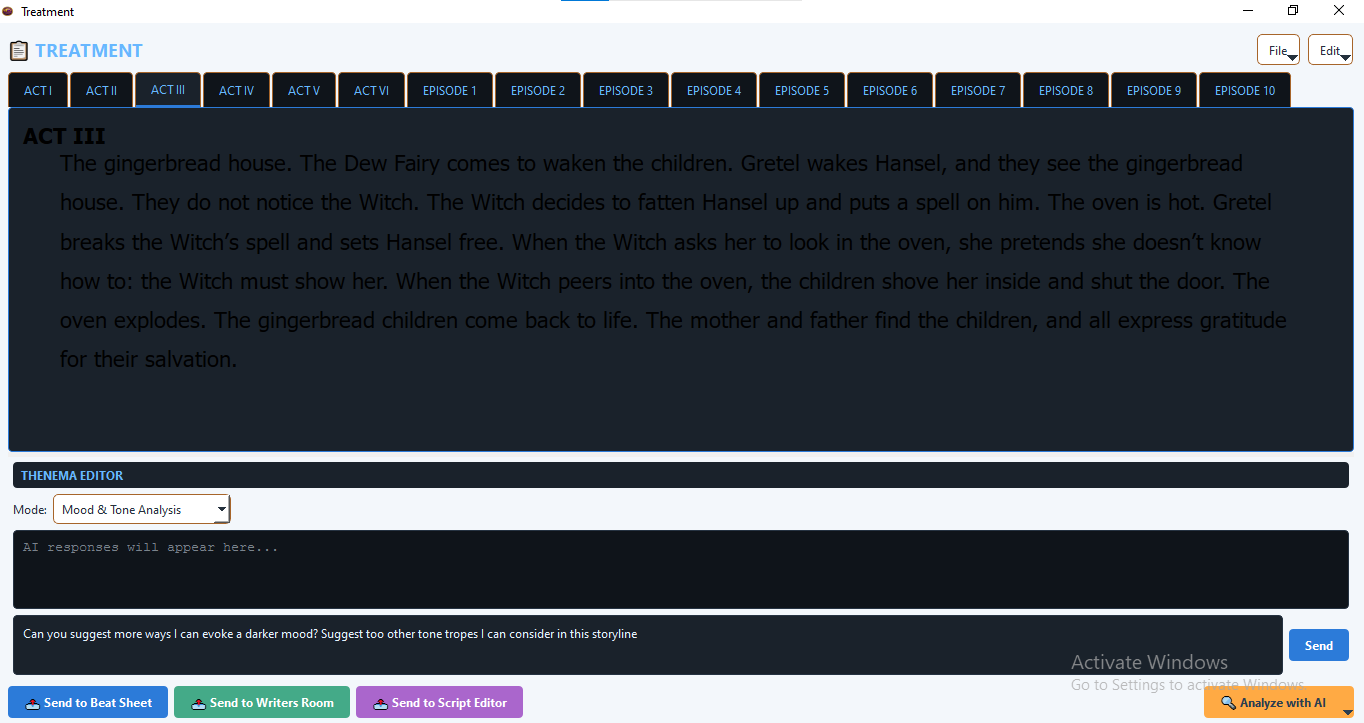
Thenema Editor
AI-assisted analysis of your treatment — available to users with an active Thenema Editor subscription.
Thenema Editor analyses the text you have written and provides feedback on character arc, mood, tone, and narrative structure. It makes recommendations and raises questions. It does not write treatment text for you. The words in every tab are always yours.
Starting an analysis
Click the 🔍 Analyze with AI button at the bottom of the panel. A menu appears with four analysis modes:
| Mode | What Thenema Editor examines |
|---|---|
| Character Arc Analysis | Identifies where your protagonist changes (or fails to change) across the treatment's acts and flags any gaps in the arc. |
| Mood & Tone Analysis | Reads the emotional register of each act and notes shifts, inconsistencies, or missed opportunities for tonal contrast. |
| Brainstorm World / Storyline | Poses questions about your story world — unexplored locations, secondary characters, thematic threads — to prompt further development. |
| Other Refinements (Chat) | Opens a free-text session where you can ask Thenema Editor specific questions about any part of your treatment. |
Using the analysis
Select text in the current act tab before clicking Analyse to direct Thenema Editor's attention to a specific passage. If no text is selected, Thenema Editor analyses the full text of the active tab.
The analysis appears in the Thenema Editor chat panel in the lower half of the window. Read the feedback and decide which suggestions, if any, to act on. You are always free to disagree with an analysis — it is a second opinion, not a directive.
File Operations
Access all file operations from the File dropdown in the panel header.
Open Text/PDF…
Loads a text or PDF file into the panel. If the file contains act headers (ACT I, ACT II, EPISODE 1 etc.) the content is automatically distributed across the matching tabs. If no headers are found, the content is loaded into the currently active tab.
Save Text…
Saves all non-empty tabs as a single .txt file. Each tab's content is preceded by its act name in a heading block (e.g. === ACT I ===). This format can be re-loaded later and will be correctly distributed back across the tabs.
Save PDF…
Saves all non-empty tabs as a formatted PDF document with a "Treatment" title heading and act name headings for each section.
Sending to Other Panels
📤 Send to Beat Sheet
Each non-empty tab's content is sent to the Beat Sheet as a set of beat cards, grouped under the act name. This is useful for converting a completed treatment into a working Beat Sheet for the next stage of development.
📤 Send to Writers Room
All non-empty tabs are combined into a single text block and sent to the Writers Room. The Writers Room receives it as a formatted treatment outline that the writing team can use as a reference while building scene cards.
📤 Send to Script Editor
The combined treatment text is appended to the Script Editor at the cursor position. Use this to have the treatment visible in the Script Editor as a reference document at the top of your script file, or to begin converting the treatment prose into screenplay scenes.
Tips & Best Practices
Complete one act at a time
Do not jump between tabs too freely in early drafts. Write ACT I from beginning to end before moving to ACT II. This forces you to resolve each act's internal logic before moving on.
Use the episode tabs for series planning
For a six-episode limited series, use EPISODE 1 through EPISODE 6 to write individual episode treatments. Use the act tabs (ACT I through ACT III) for the series-level arc — the overall story that spans all six episodes.
Word count is a useful discipline
Professional one-page-per-act treatments average around 300–500 words per act for a feature. If your ACT II treatment is 150 words, you probably have not yet worked out what happens in it. If it is 2,000 words, you may be writing a script rather than a treatment.